
A Simple Chrome Extension Launch Checklist for Makers
 Jan Orsula
Why Most Chrome Extensions Die in the 'Store Graveyard'
You finally finished the build. You zipped the directory, paid your $5 developer fee to Google, and clicked publish. For a few hours, you constantly refresh your developer dashboard waiting for the review to pass. Then the approval email arrives. You are officially live.
And then... nothing happens.
A week goes by. You have exactly three installs. One is you, one is your mom, and the third is a buddy you guilt-tripped into trying it out. Your project is slowly sinking to page fifty of the search results, buried under a mountain of abandoned tools and spammy coupon clippers.
Most founders get this wrong. They treat a web store launch exactly like pushing a standard web app to production. They assume that if the code works, the users will magically find it.
That is not how distribution works. The Chrome Web Store is a highly specific ecosystem with its own search algorithms, strict compliance rules, and brutal conversion metrics. If your store listing looks cheap, nobody installs it. If your permissions trigger a warning, users bounce. If you don't have a coordinated push on day one, the algorithm ignores you.
To fix this, you need a systematic approach to getting your tool out of the sandbox and onto thousands of browsers. That is exactly why I put together this Chrome extension launch checklist. It forces you to treat your deployment like a real product launch, not just a git push.
What is a Chrome Extension Launch Checklist?
A Chrome extension launch checklist is a comprehensive framework that outlines every step required to successfully publish and market a browser extension. It covers technical compliance for passing Google's review, store optimization for organic search visibility, and multi-channel distribution strategies to acquire initial users. Using this checklist prevents makers from launching to zero installs and ensures the extension ranks well in the Web Store.
The High Stakes of a Web Store Launch
Publishing an extension is fundamentally different from launching a SaaS app on your own domain. You do not control the platform. Google holds the keys.
The review process alone is enough to break a maker's spirit. A minor mistake in your `manifest.json` or an overzealous permission request can trap your extension in a pending state for weeks. I have seen founders hype up their product on Twitter for a specific Tuesday launch, only to realize their extension was randomly rejected on Monday night because they used a banned keyword in their description.
Then there is the issue of discoverability. The Web Store search engine is primitive compared to traditional Google Search. It heavily relies on exact keyword matches in your title, total active user count, and recent review velocity. If you fail to generate a burst of installs and reviews in your first 48 hours, you fall into a 'shadow ban' of irrelevance. You will not show up in the related items tab. You will not rank for your core keywords. You will just sit there.
This is why winging it simply does not work. You need to engineer your launch.
Strategy 1: Technical Readiness and Compliance
Your marketing strategy is entirely useless if Google refuses to publish your code. The technical review team has become incredibly strict over the last few years, mostly to combat malicious adware. You have to prove that your extension is safe, performant, and compliant.
Mastering Manifest V3 Requirements
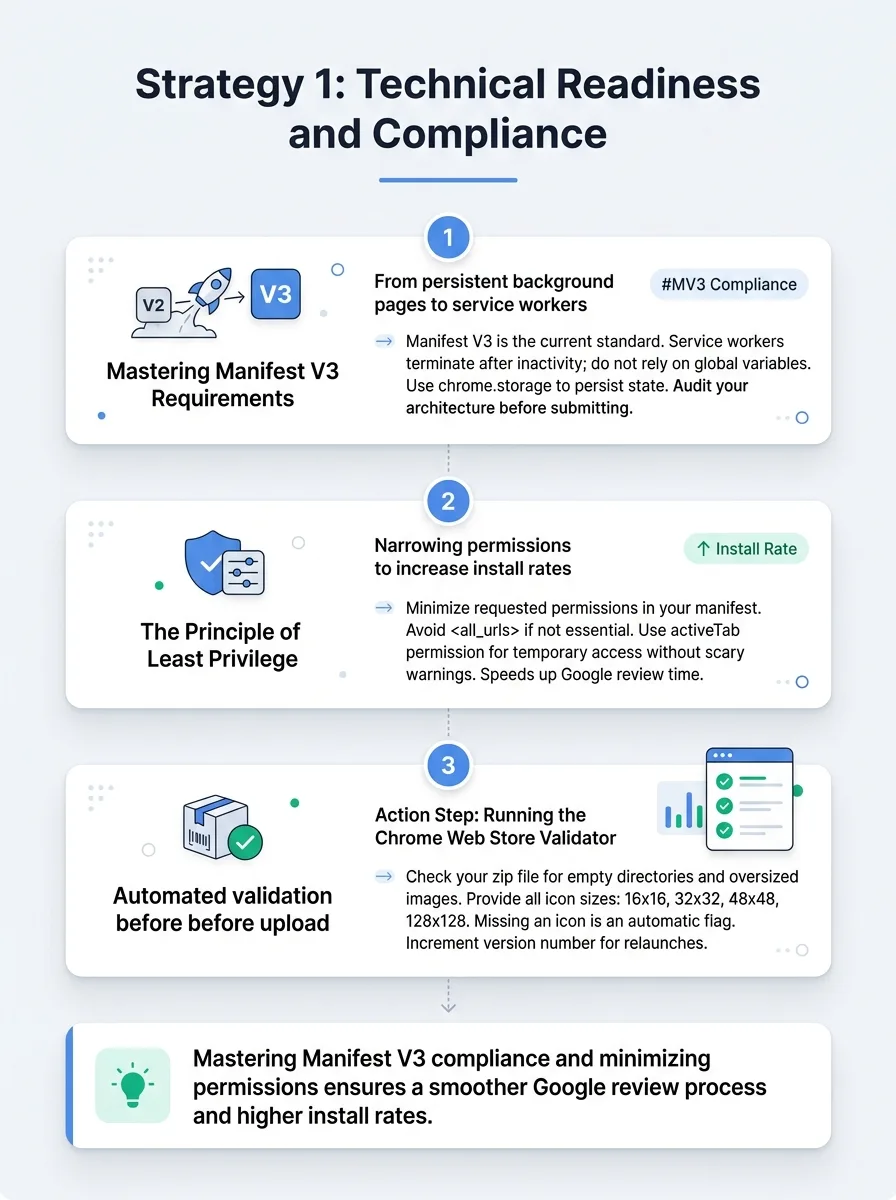
If you are still trying to ship with Manifest V2, you are already dead in the water. Manifest V3 is the current standard, and Google enforces it strictly. The biggest hurdle makers face here is the shift from persistent background pages to service workers.
In the old days, your background script could just sit there forever, holding variables in memory. Now, your service worker will aggressively terminate after a period of inactivity. If you rely on global variables to hold user state, your extension will randomly break when the worker goes to sleep. You have to use `chrome.storage` to persist state.
Before you even think about submitting, audit your architecture. Make sure you fully understand the official Manifest V3 documentation regarding background context and network request interception. Getting this wrong guarantees a rejection.
The Principle of Least Privilege
When users click "Install," Chrome shows them a popup detailing what your extension can access. This popup is the number one conversion killer in the entire process.
If your tool simply changes the background color of a specific website, but your manifest requests `` permission, the user will see a terrifying warning: "This extension can read and change all your data on all websites." Most sane people will hit cancel.
Audit your `permissions` and `host_permissions` arrays. Do you really need global access, or can you use the `activeTab` permission? The `activeTab` permission gives you temporary access to the currently visible tab when the user clicks your extension icon. It does not trigger the scary warning. Narrowing your permissions down to the absolute minimum will drastically increase your install rate and cut your Google review time in half.
Action Step: Running the Chrome Web Store Validator
Do not wait for a human reviewer to tell you your package is broken. Use automated validation before you upload. Check your zip file for empty directories, oversized images, or missing icons. Ensure you have provided a 16x16, 32x32, 48x48, and 128x128 icon in your manifest. Missing a single icon size is an automatic flag. Double-check that your version number has been incremented properly if this is a relaunch.
Strategy 2: Conversion-Focused Asset Creation
Once you pass the review, your store listing becomes your primary landing page. You have roughly three seconds to convince a visitor to click that blue button. If your page features a single tiny screenshot of code and a one-sentence description, they will bounce.
Designing 'Scroll-Stopping' Screenshots
I cannot stress this enough: your screenshots need to sell the outcome, not just show the UI. A raw, unedited screenshot of your extension dropdown menu is boring.
What actually works is treating your 1280x800 store images like miniature billboards. Use a solid, high-contrast background color. Place a stylized mockup of your extension on the right side of the image. On the left side, use massive, readable text to state the exact value proposition.
Imagine you built a tool that formats JSON. Your first screenshot shouldn't just be text. It should say "Format messy JSON in one click" in huge letters, with an arrow pointing to the clean output. Make it so obvious that a five-year-old could understand what the tool does just by looking at the pictures.
Extension SEO (ASO) for Organic Discovery
App Store Optimization (ASO) in the Web Store is beautifully simple, but completely unforgiving. The search algorithm heavily weights the extension title and the first paragraph of the description.
Never name your extension just a clever brand name. If you built a productivity timer named "Pomodorify", nobody will find it. You must append your core keywords directly into the title field. The optimal format is `[Brand Name] - [Core Function]`.
Change the title to "Pomodorify - Focus Timer & Site Blocker". This instantly tells the algorithm exactly what you do.
In your description, write for humans but structure for bots. The first sentence needs to include your primary search terms naturally. Do not keyword stuff at the bottom of the page. Google has started actively issuing shadow bans for listings that dump comma-separated keywords at the end of their descriptions. Just write clear, feature-rich paragraphs.
Strategy 3: The 'Build in Public' Distribution Loop
Launching to an empty room is depressing. You need a crowd waiting for you on day one. This requires building hype while you are still writing the code.
Choosing the Right 'Makers' Communities
You need to go where early adopters hang out. X (formerly Twitter), Indie Hackers, and niche subreddits are goldmines for initial feedback. But you cannot just show up and drop a link. You have to document the journey.
Share a video of the bug that kept you up until 3 AM. Post a poll asking people which logo concept they prefer. Share your revenue goals. People connect with founders, not faceless software. When you build a narrative around the creation of the extension, people feel invested in its success. They want to see you win.
Creating a Beta Waitlist to Seed Early Reviews
This is a tactical move that separates amateur makers from pros. Do not make your extension public immediately. Publish it as "Unlisted".
An unlisted extension can only be installed by people who have the direct link. Use this phase to share the link exclusively with your waitlist, your Discord community, or your Twitter followers. Having a clear structure is key here, which is why reviewing The 3-Tier Pre-Launch Checklist Every Maker Needs can help you organize this early testing phase.
Ask these early beta testers for two things: bug reports and an honest Web Store review. By the time you switch the extension from Unlisted to Public, you will already have twenty 5-star reviews and fifty active users. When random organic traffic starts landing on your page, you will look like an established, highly-rated product instead of a risky new upload.
Strategy 4: The 'Big Bang' Launch Day Framework
Day one is about orchestrating a massive spike in traffic to tell the Web Store algorithm that your extension is trending. This pushes you up the category charts and secures long-term organic visibility.
Winning the Product Hunt 'Maker' Comment
Product Hunt is still the best place to launch a developer tool or productivity extension. But a good launch requires more than just decent screenshots. It requires a compelling narrative.
Your "Maker Comment" is the first thing people read after looking at your gallery. Do not just list your features. Tell the story of the pain point. Explain the exact moment you got so frustrated with existing solutions that you decided to code your own. Tell them about the late nights. If you are unfamiliar with formatting this narrative, learning First Launch? How to Get Your First Upvotes on Product Hunt will show you exactly how to structure your opening message.
Be actively present in the comments for the entire 24-hour cycle. Answer every single question. Thank every person who gives feedback. High engagement in the comments keeps your post on the front page.
Navigating the Reddit Minefield
Reddit can drive thousands of installs in an hour, but Redditors are violently allergic to marketers. If you drop into r/SideProject or r/InternetIsBeautiful with a slick, corporate pitch, you will be downvoted into oblivion and banned.
You have to lead with value and vulnerability. Use a title like, "I got tired of losing my browser tabs, so I built a free extension to group them by project." In the post body, explain exactly how the code works under the hood. Share your tech stack. Acknowledge the rough edges. Provide the link at the very end as an afterthought. When you approach Reddit as a fellow builder sharing a cool toy, they will rally behind you.
Strategy 5: Retention and Review Engineering
Getting the install is only half the battle. If a user installs your extension, gets confused, and uninstalls it five minutes later, Google tracks that. High churn rates will tank your search ranking. You need them to stay.
The First-Run Onboarding Experience
Never leave a user hanging after they click install. By default, Chrome just adds a tiny icon to the puzzle piece menu and does absolutely nothing else. The user sits there thinking, "Okay, now what?"
You need to programmatically open an onboarding tab immediately upon installation. Use `chrome.runtime.onInstalled.addListener` to trigger a new tab pointing to your welcome page. On this page, thank them for installing. Show a 15-second looping GIF demonstrating exactly how to pin the extension to their toolbar. Give them one clear, simple task to complete to experience the core value of your tool immediately.
Automating the 5-Star Review Prompt
Reviews are the lifeblood of the Web Store. Without them, you do not rank. But asking for a review too early is annoying, and waiting too long means they will forget.
You need to ask for the review at the exact moment of user joy. Track a "success metric" within your extension. If you built a grammar checker, do not ask for a review on day one. Ask for a review immediately after the user has successfully corrected their 50th typo. They are feeling the value of your product right then. Pop up a small, non-intrusive notification: "Enjoying the tool? A quick review helps me keep it free." Understanding this timing is crucial for converting casual users into advocates, much like the broader strategy of learning How to Turn Launch Traffic Into Paying Users - Step by Step.
Real-World Launch Success Stories
Let's look at what happens when makers actually follow this process.
Consider the case of a developer who built a simple JSON formatter. They initially launched with a generic title, no onboarding, and `` permission. After three months, they had 45 users. They pulled the extension, rewrote the manifest to only use `activeTab`, changed the title to target specific developer search intents, and built a post-install welcome screen. They relaunched via an unlisted link to get 15 reviews from their developer friends, then took it public. Within 60 days, they crossed 12,000 active users organically.
Another founder built a tool to block distracting websites. Instead of just launching silently, they documented their own struggle with ADHD and procrastination on X. They built a waitlist of 400 people. On launch day, they directed all those people to Product Hunt. The extension hit #2 for the day, driving over 3,000 installs. Because they had a review prompt timed after a user successfully completed a 2-hour focus block, they generated hundreds of 5-star reviews within a week.
These aren't flukes. This is just what happens when you follow a structured Chrome extension launch checklist.
Managing Your Launch Pipeline with WeekHack
Looking at all these steps can feel overwhelming. You have code to write, bugs to fix, and now a massive marketing pipeline to manage. It is incredibly easy to drop the ball.
In practice, the best way to handle this is to organize your tasks into distinct, time-boxed sprints. I use WeekHack to break the entire launch process down into weekly chunks. Instead of staring at a giant, paralyzing to-do list, I set up a pre-launch week dedicated solely to store assets and waitlist building. The actual launch week is focused purely on distribution and community engagement. By participating in WeekHack's weekly product launches, you can align your extension's debut with an active community of makers who are ready to test, upvote, and provide the critical early feedback you need.
The Essential Chrome Extension Launch Checklist (Summary)
If you want to skip the theory and just get to work, here is the exact Chrome extension launch checklist you need to follow:
Audit Permissions: Reduce your manifest permissions to the absolute minimum required. Use `activeTab` whenever possible.
Verify Manifest V3: Ensure you are using service workers properly and handling background state via `chrome.storage`.
Validate the Package: Run your zip file through automated checks to catch missing icons or bad file paths.
Design Scroll-Stopping Assets: Create 1280x800 screenshots with bold text callouts and high-contrast backgrounds.
Optimize for ASO: Use the `[Brand Name] - [Core Function]` format for your title. Front-load your description with natural keywords.
Build in Public: Share your development journey on X, Indie Hackers, and Reddit to build an early audience.
Seed Early Reviews: Publish as 'Unlisted' first. Get 10-20 trusted beta testers to install and leave 5-star reviews.
Build an Onboarding Flow: Trigger a welcome page on install that teaches the user how to pin the icon and take their first action.
Coordinate the Launch: Post on Product Hunt with a compelling maker story. Share value-first posts in relevant subreddits.
Automate Review Prompts: Trigger a review request only after the user has experienced a distinct 'aha' moment or success action.
Frequently Asked Questions
How long does the Chrome Web Store review take?
Review times vary wildly based on your permissions. If your extension requires minimal permissions (like just modifying the active tab), the automated review can approve it within 24 to 48 hours. If you request broad permissions like `` or access to sensitive data, it triggers a manual human review. This process typically takes between 3 to 14 days, though it can stretch longer during holidays.
Can I launch a paid Chrome extension?
Yes, but Google no longer handles the payments. The Chrome Web Store Payments system was deprecated a few years ago. You must handle the payment gateway yourself or use a third-party merchant of record like Stripe, Lemon Squeezy, or ExtensionPay. You will need to build an authentication flow (usually via Firebase or Supabase) to verify if the user has an active subscription before granting access to premium features.
What are the promotional tile requirements?
Google requires specific image assets for your store listing. The mandatory sizes are the store icon (128x128), a small promo tile (440x280), and at least one screenshot (1280x800 or 640x400). You also have the option to include a marquee promo tile (1400x560), which is highly recommended if you want a chance to be featured on the Web Store homepage.
Final Thoughts: From First Build to First 1,000 Users
Building a Chrome extension is one of the fastest ways to ship a product and solve a real problem. But code alone does not acquire users. You have to put just as much effort into your store metadata, your onboarding flow, and your distribution strategy as you did into your background scripts.
Stick to the checklist. Take the time to build a proper waitlist, design beautiful assets, and launch with purpose. If you use a platform like WeekHack to stay organized and tap into an active maker community, hitting that first milestone of 1,000 active users is not just possible—it is entirely predictable. Now get back to shipping.
Written by

Jan Orsula
Serial maker and founder of WeekHack, SocialCal, and SocialOrbit. Builds tools that help creators launch side projects, schedule social media, and generate content — so they can focus on what matters.
Related Articles
How to Get Comments on Product Hunt: 5 Proven Launch Strategies
Most makers obsess over Product Hunt upvotes, but comments are what actually drive the ranking algorithm. Learn how to craft the perfect maker story, run feedback-first outreach, and dominate the first 4 hours of your launch.
How to Plan a Startup Launch That Gains Real Traction
Learn how to plan a startup launch that actually gets traction. From finding your early users to engineering a launch day spike, here is the exact playbook indie hackers use.
How to Launch an AI Tool and Rank #1 on Product Hunt
Learn exactly how to launch an AI tool on Product Hunt and claim the top spot. This practical guide covers pre-launch community building, high-converting asset optimization, and a 24-hour tactical sprint.