
How to Avoid Keyword Cannibalization on Startup Websites
 Jan Orsula
Imagine you spend a week building a feature nobody asked for. That same time could have gone into talking to 10 potential users. Writing SEO content without a clear structure is the exact same waste of resources. You hit publish on two dozen articles. Traffic trickles in, then flatlines entirely. You check Search Console and see your pages constantly swapping places on page three of Google. Sound familiar?
Most founders make this mistake. They write so much about their core product that they end up competing with themselves. Figuring out how to avoid keyword cannibalization on startup SEO pages is the difference between stagnant traffic and consistent organic growth. Look, search engines want one definitive answer per topic. If you give them five mediocre answers, they just get confused. Let's fix your site structure so you stop getting in your own way.
What is Keyword Cannibalization on Startup SEO Pages?
Keyword cannibalization on startup SEO pages happens when multiple URLs on your domain target the identical search intent, forcing them to compete against each other in search results. This internal competition confuses search engine crawlers about which page should be the primary resource. As a result, link equity is split, click-through rates drop, and neither page ranks on the first page of Google.
Why Managing Search Intent is a Nightmare for Growing Startups
Startups move incredibly fast. You build a feature, you write a blog post about it. Next month, you update the feature and write another post. A year later, your blog is a graveyard of overlapping product updates and marketing announcements. What nobody tells you is that this aggressive publishing rhythm quietly destroys your organic traffic.
Founders typically lack a centralized content map. You just want to get words on the screen to hit your weekly marketing goals.
Product-led growth models make this even worse. Since your product solves a highly specific niche problem, almost everything you write circles back to the exact same core topic. If you built an invoicing tool for freelancers, naturally, every blog post mentions freelance invoicing. Your entire site becomes a massive echo chamber.
In practice, this creates a total architectural mess. You end up with a landing page optimized for "freelance invoice software", a blog post titled "why you need freelance invoice software", and a feature update called "our new freelance invoice software features". Google has absolutely no idea which URL to show a user searching for that phrase. So it chooses none of them. Your own pages wage a civil war against each other.
Strategy 1: Conduct a Rigorous Content Intent Audit
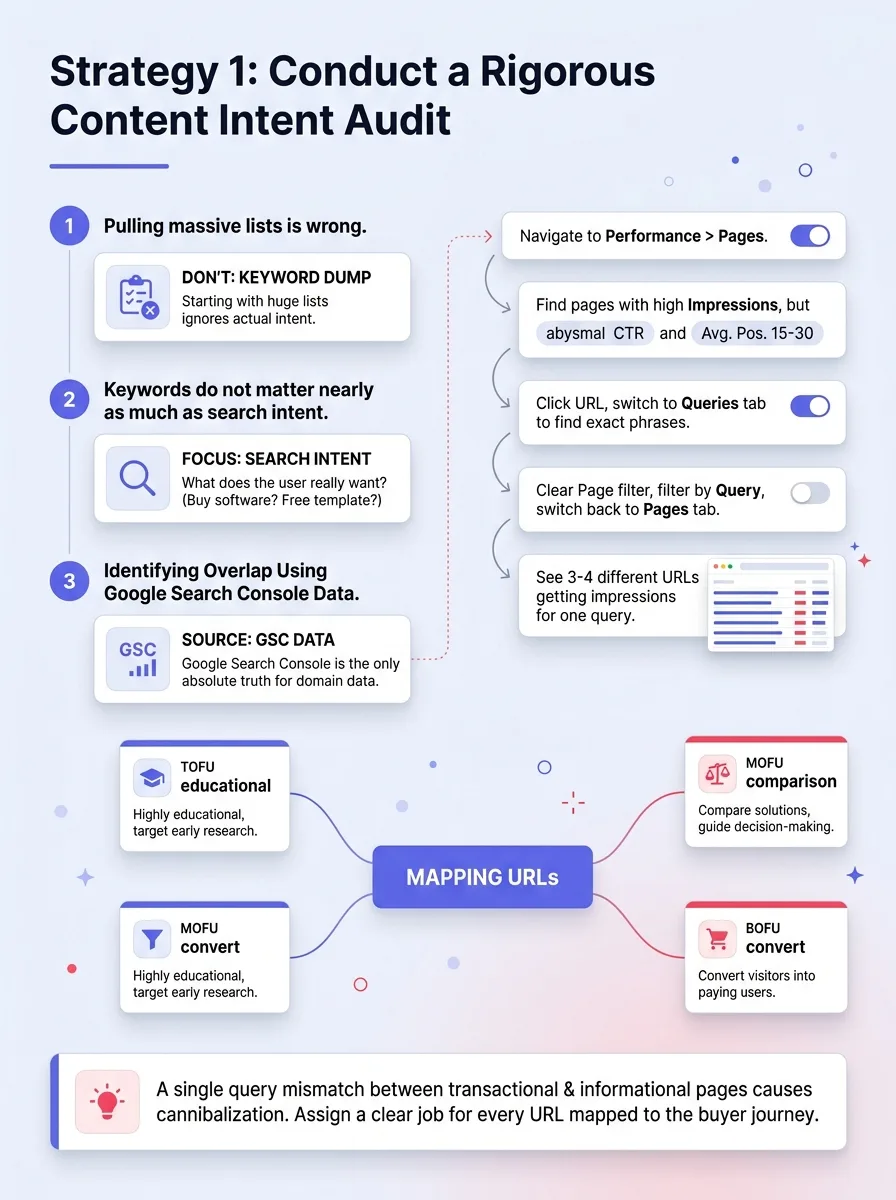
You cannot fix what you cannot see. Most makers start by pulling a massive list of keywords from an SEO tool. That is the wrong approach entirely. Keywords do not matter nearly as much as search intent.
Intent is simply what the user actually wants when they type a phrase into the search bar. Do they want to buy software, or do they want a free template? If you have a landing page selling a product and a blog post giving away a free template ranking for the same term, you have an intent mismatch causing cannibalization.
Identifying Overlap Using Google Search Console Data
Google Search Console is the only source of absolute truth for your domain. Third-party tools guess. Search Console knows.
Here is the exact workflow to find cannibalization. Open Search Console and navigate to the Performance report. Click on the Pages tab. Look for URLs that have a high number of impressions but an abysmal click-through rate and an average position hovering between 15 and 30.
Next, click on one of those underperforming URLs and switch to the Queries tab. Look at the exact phrases bringing in those impressions. Now, clear the page filter, click the Queries tab first, select that specific query, and switch back to the Pages tab.
You will likely see three or four different URLs from your domain getting impressions for that single query. This is the smoking gun. Your pages are eating each other.
Action Step: Mapping Every URL to a Specific Funnel Stage
Now that you see the overlap, you have to assign a job to every page. If you followed a solid pre-launch checklist, you probably outlined exactly who your target user is. Now you need to map out how they buy.
Categorize your overlapping pages into Top of Funnel (TOFU), Middle of Funnel (MOFU), and Bottom of Funnel (BOFU).
A TOFU page is highly educational. A MOFU page compares solutions. A BOFU page converts visitors directly into paying users. If you have two BOFU pages targeting the exact same keyword, one has to go. They must serve distinctly different stages of the buyer journey, even if the primary topic remains similar.
Strategy 2: Establish a Pillar-and-Spoke Architecture
The best way to tell search engines which page is your ultimate authority on a topic is to use a hub-and-spoke content model. This forces you to organize your site logically.
Without a clear hierarchy, your site is just a flat folder of text documents. Google hates flat folders. It wants to see a structured library.
The Hub-and-Spoke Model for SaaS Product Features
Think of your broad, highly competitive search term as the hub. This is the Parent page. For a SaaS product, this is usually your core feature landing page. It should be comprehensive, heavily designed, and focused on conversions.
The spokes are your Child pages. These target highly specific long-tail queries. They are usually blog posts or detailed tutorial docs. The crucial rule here is that Child pages must link back up to the Parent page using exact-match anchor text, and they must never target the Parent page's primary keyword.
Example: Transforming 10 Random Blog Posts into one Definitive Guide
Let us say you spent a year writing 10 different blog posts about "how to reduce churn". None of them rank well because they all cannibalize each other.
What actually works is taking the best insights from all 10 posts and consolidating them into one massive, definitive pillar page titled "The Ultimate Guide to Reducing SaaS Churn". This becomes your hub.
Then, you take the highly specific technical pieces from the old posts—like "how to use Stripe webhooks to handle failed payments"—and turn those into distinct spoke articles. The spoke articles link up to the ultimate guide. The ultimate guide links down to the spoke articles. You just turned a messy pile of competing pages into a cohesive ranking machine.
Strategy 3: Master the Art of Strategic Merging and Pruning
Sometimes the best SEO strategy for a startup is just pressing the delete button. Most makers hate this. You spent hours writing that post. It feels wrong to trash it.
Keeping weak, cannibalizing pages alive drags down your entire domain authority. You have to trim the dead weight.
When to 301 Redirect vs. When to Rewrite
You have two choices when dealing with competing pages: merge them or kill one entirely. Here is the decision-making framework.
If both pages have decent backlinks but neither ranks in the top 10, merge them. Take the better-performing URL and rewrite it to include the best content from both. Then, take the weaker URL and set up a permanent 301 redirect pointing to the winner.
If the weaker page has zero backlinks, zero organic traffic, and offers zero unique value, just delete it. Return a 404 status code. Let it die. Not every page deserves to be redirected.
Preserving Link Equity During Content Consolidation
The biggest risk when merging content is losing the hard-earned authority those pages already built. According to Google Search Central guidelines, a proper 301 redirect passes full link equity to the destination page.
Always map your redirects carefully in a spreadsheet before implementing them on your server. Check your analytics to ensure the destination page is actually relevant to the old page's content. If you redirect a post about "email marketing metrics" to your homepage just to save the links, search engines will treat it as a soft 404 and drop the link equity anyway. Relevancy is mandatory.
Strategy 4: Use Internal Linking to Signal Hierarchy
Internal linking is how you cast votes for your own pages. If you do not vote for your primary landing page, why should a search engine?
Many startups fail to realize that the anchor text they use inside their own blog posts sends a massive signal to crawlers about what a specific URL is supposed to rank for.
Optimizing Anchor Text for Your 'Primary' Pages
If your main landing page is trying to rank for "CRM for real estate", every other page on your site that mentions this concept should link to that landing page using that exact phrase.
Do not use lazy anchor text like "click here" or "read more". That tells Google nothing. Use exact-match anchor text to point toward your main Parent page. For your supporting Child posts, use natural variations and long-tail phrases. This deliberate structure creates a clear hierarchy of importance.
Fixing the 'Internal Competition' with Breadcrumbs
Breadcrumb navigation is an easy technical win that physically structures your hierarchy on the page. It provides a clickable trail from the homepage down to the current article.
Implementing proper breadcrumb schema markup reinforces your site structure to crawlers. It explicitly shows them that the specific blog post they are reading sits underneath the broader category page. This helps prevent the blog post from outranking the category page for broad search terms.
Strategy 5: Leverage Canonical Tags for Necessary Duplication
There are times when you absolutely need multiple pages that look identical to a search engine. This usually happens when marketing teams get involved with paid ads or a/b testing.
You cannot just merge these pages. They serve distinct business purposes. This is where canonical tags save your domain.
Handling Regional Variations and Landing Page Tests
When you are figuring out how to launch a SaaS product, you often build distinct landing pages tailored for specific communities like Product Hunt, Hacker News, or Twitter. The copy on these pages might be 90% identical to your main homepage.
If search engines index all of these promotional landing pages, you will instantly trigger massive keyword cannibalization. The technical fix is adding a `rel="canonical"` tag to the header of every promotional page, pointing back to your main homepage. This tells Google: "I know these pages look identical. Please ignore this promotional one and pass all ranking signals to my homepage."
Action Step: Auditing Your CMS for Auto-Generated URL Conflicts
Most founders do not realize their CMS is quietly generating hundreds of useless pages behind their back. WordPress, Webflow, and Ghost often auto-generate category archives, author pages, and tag feeds.
If you tag a blog post with "SEO", your CMS might generate a `/tag/seo/` page that lists every post with that tag. That tag page will instantly start cannibalizing your actual, high-quality article about SEO. Go into your CMS settings right now and set all tag and author archives to "noindex" unless you have a specific strategic reason to keep them in search results.
Real-World Scenarios: Cannibalization in the Wild
Theory is great, but looking at real mistakes makes this much easier to understand.
The 'Feature Page' vs. 'Comparison Blog' Conflict
I recently consulted for a SaaS startup that built an incredible scheduling tool. Their primary goal was ranking for "Calendly alternative". They built a beautiful, high-converting landing page targeting this exact keyword.
Six months later, their content marketer wrote a massive 3,000-word blog post titled "Top 10 Calendly Alternatives for 2024". The blog post was objectively better content. It started ranking on page one. The high-converting landing page completely disappeared from the search results.
Traffic spiked, but conversions tanked. People reading the blog post were just browsing. People looking for the landing page wanted to buy.
We fixed this by leaning into the cannibalization. We accepted that Google preferred the blog post for that specific intent. We redesigned the top section of the blog post to heavily promote their own tool as the number one option, and added a massive CTA button right below the introduction. We stopped fighting Google's intent algorithm and adapted the winning page to serve our conversion goals.
How to Avoid Keyword Cannibalization on Startup SEO Pages Effectively with WeekHack
Keeping track of who is publishing what across product and marketing teams gets chaotic as you scale. You need a system to ensure your next big feature announcement does not accidentally destroy your core organic traffic.
Integrating SEO Intent into Your Product Launch Cycle
This is where active builders use WeekHack to maintain operational clarity. When you plan your weekly product launches, you map out the exact URL structure and search intent for your launch assets beforehand.
By putting your launch roadmap in front of a community of indie hackers, you force yourself to articulate exactly what the new feature does and which specific long-tail problem it solves. This naturally prevents you from writing generic, overlapping content. Plus, participating in the community helps you secure guaranteed dofollow backlinks to the correct, primary landing pages, reinforcing the hierarchy we established in the strategies above.
The Startup SEO Checklist: 7 Steps to Clean Rankings
Here is the exact process to run through once a quarter to keep your site architecture pristine.
Pull the Search Console Performance report and sort queries by impressions.
Identify any single query where more than one of your URLs appears in the results.
Determine the core search intent for that specific query.
Pick one clear winner page that best serves that intent.
Rewrite the winning page to include any valuable information from the losing pages.
Set up permanent 301 redirects from the losing URLs to the winner.
Update all internal links across your site to point to the winning URL with exact-match anchor text.
Frequently Asked Questions About Keyword Cannibalization
Is it ever okay to have two pages ranking for the same keyword?
Yes, but it is rare. This is called "double-dipping" in the SERPs. It only works for highly authoritative domains where Google decides to show two results from the same site right next to each other. For 99% of startups, attempting this just dilutes your authority and drops both pages lower down the page. Aim for one strong page.
How do I know if cannibalization is actually hurting my traffic?
Look for ranking volatility. If you check your keyword tracker and see URL A ranking at position 12 on Monday, and URL B ranking at position 15 on Tuesday for the exact same term, you have a problem. Google is constantly swapping them out because it cannot decide which one is better. This volatility prevents either page from ever breaking into the top 3 spots where the actual traffic lives.
How often should a startup audit for keyword overlap?
If you publish one article a week, a quarterly audit is perfectly fine. If you run a programmatic SEO play or publish daily, you need to run an intent check monthly. The best defense is proactive planning. Never hit publish without explicitly knowing which primary keyword a page owns.
Conclusion: Scaling Your Content Without Sabotaging Your Results
Fixing cannibalization is not about producing less content. It is about producing highly intentional content. Every page on your startup website needs a specific job and a unique search intent to conquer. Stop letting your own pages fight each other for traffic. Map your structure carefully, prune the weak URLs aggressively, and use communities like WeekHack to validate your launch strategies before you accidentally break your own rankings.
Written by

Jan Orsula
Serial maker and founder of WeekHack, SocialCal, and SocialOrbit. Builds tools that help creators launch side projects, schedule social media, and generate content — so they can focus on what matters.
Related Articles
How to Get Comments on Product Hunt: 5 Proven Launch Strategies
Most makers obsess over Product Hunt upvotes, but comments are what actually drive the ranking algorithm. Learn how to craft the perfect maker story, run feedback-first outreach, and dominate the first 4 hours of your launch.
How to Improve Your Launch Conversion Rate Step-by-Step
Struggling to turn product launch traffic into actual sales? Discover a practical, step-by-step framework to fix your messaging, remove friction, and drastically improve your conversion rates.
How to Collect User Feedback Before Launch: A Beginner's Plan
Stop guessing what your users want. Learn how to systematically collect pre-launch feedback using smoke tests, problem interviews, and lo-fi prototypes before writing a single line of code.