
25+ Best and Free Instagram Tools for 2026: Complete Guide
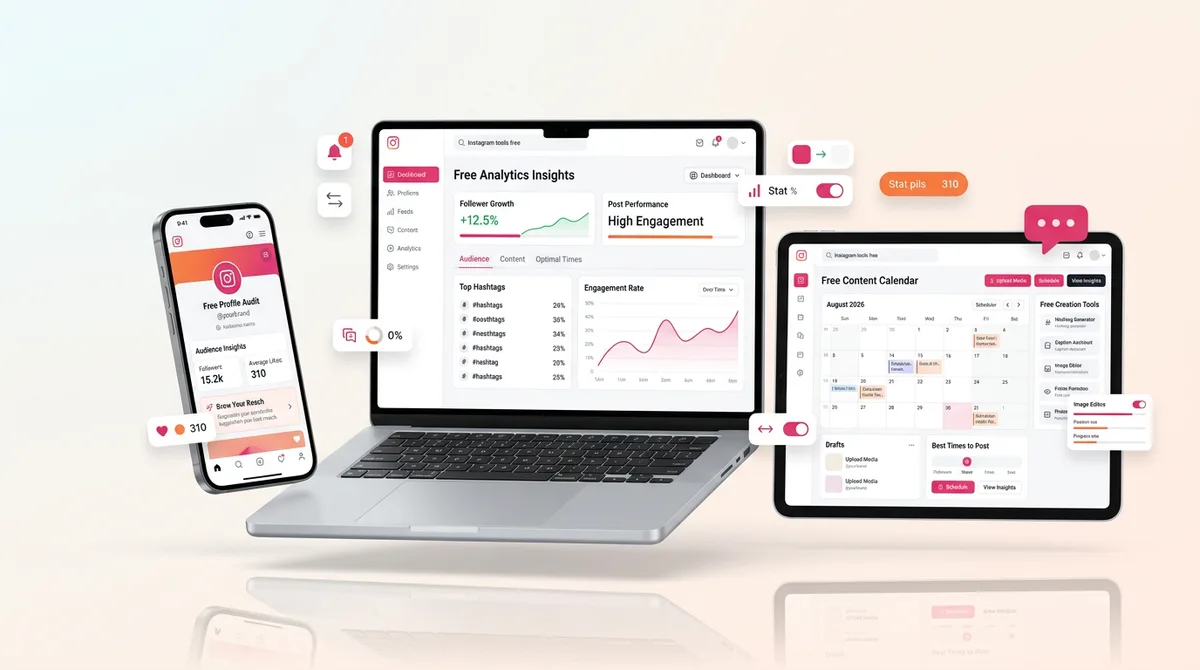
Why Instagram tools matter more than ever in 2025?
Instagram isn’t the same platform it was even a year ago.
It’s evolved from a photo-sharing app into a full-scale ecosystem for business, entertainment, AI-driven content, e-commerce, and community building. The competition? Fiercer. The algorithm? Smarter. The opportunities? Bigger — if you’re using the right tools.
Whether you’re a creator trying to monetize content, a business owner looking to drive conversions, or a marketer aiming to analyze performance and scale campaigns, your Instagram success now depends more than ever on the tools you choose.
The problem? Most “Instagram tools” articles just list a few apps, add a sentence or two, and call it a day. No pricing breakdowns, no implementation strategies, no real-world comparisons. That’s where this guide is different.
1. Understanding Instagram Tool Categories
Before choosing the best tools, you need to understand how they actually fit into your Instagram workflow. Not every tool is designed to grow your followers or boost engagement — some help you create content faster, track analytics, collaborate with a team, or even generate sales on autopilot.
Here’s a breakdown of the core Instagram tool categories in 2025 — and how they work together to form a complete Instagram stack.
1. Content Creation Tools
These help you design posts, edit Reels, polish Stories, or even use AI to generate captions and images.
Popular formats they support:
Static carousels
Reels with trending audio
Infographics and data visuals
AI-generated scripts and captions
Top tools in this category: Canva, CapCut, InVideo, Jasper, Adobe Express, Opus Clip
2. Scheduling & Publishing Tools
Timing still matters — but consistency matters more. Scheduling tools help you post content automatically, even across multiple accounts.
Features often include:
Content calendar views
Auto-publishing of Reels and carousels
Best-time-to-post suggestions
Team collaboration features
Top tools in this category: Later, Buffer, Metricool, Planoly, Hootsuite
3. Analytics & Reporting Tools
Analytics tools do more than track follower counts. They offer data that helps you make smarter content decisions and measure ROI.
Key metrics you can track:
Follower growth over time
Content engagement (likes, comments, saves, shares)
Story completion rates
Conversion rates from bio link clicks or DMs
Top tools in this category: Iconosquare, Socialinsider, Instagram Insights (native), Sprout Social
4. Growth & Engagement Tool
These tools are designed to increase visibility, drive engagement, and sometimes automate interactions (with caution).
Functionality may include:
Hashtag analysis and optimization
Comment and DM automation
Engagement tracking dashboards
Giveaways and user-generated content features
Top tools in this category: Flick, Inflact, Kicksta (non-bot), Manychat, IG DM Automation via Meta
5. Hashtag & Research Tools
Still relevant in 2025 — especially when used strategically. These tools help you discover high-performing, niche-specific hashtags that actually work.
Features to look for:
Competitor hashtag analysis
Banned or shadowbanned hashtag filters
Keyword clustering and trend monitoring
Top tools in this category: Flick, Hashtag Expert, RiteTag, IQHashtags
6. Automation Tools (Ethically Used)
Automation isn’t inherently bad — it’s how you use it. In 2025, ethical automation means freeing up time while keeping your voice and authenticity intact.
Popular use cases:
DM auto-replies based on keywords
Welcome sequences
Story replies to lead magnets
Lead capture workflows
Top tools in this category: Manychat, Meta’s built-in DM Automation, MobileMonkey, Chatfuel
2. Essential Free Instagram Tools for Beginners
If you’re just starting out on Instagram in 2025, you don’t need an expensive stack of tools — but you do need smart ones.
The biggest mistake beginners make? Trying to do everything manually or relying only on the Instagram app. That might work if you're posting for fun… but if you're trying to grow an audience or promote a business, the right tools can cut your content creation time in half, boost your reach, and help you stay consistent — all without overwhelming you.
Let’s break down the must-have beginner-friendly Instagram tools, categorized by use case.
1. Canva – Your All-in-One Visual Design Tool
Use it for: Posts, Stories, Reels covers, highlight icons
Why it’s great:
Drag-and-drop editor with 1,000s of templates
Built-in Instagram post sizing
AI tools like Magic Resize and Magic Write for captions
Ideal for non-designers
Pricing: Free plan available; Pro starts at $12.99/month
Pro Tip: Use Canva’s content calendar to visually plan your posts ahead of time.
2. Metricool (or Later) – Scheduling Made Easy
Use it for: Planning, scheduling, and analyzing posts
Why it’s great:
Visual content calendar
Instagram Reels auto-publishing (not all schedulers allow this!)
Smart posting time suggestions
Preview your feed before posting
Pricing: Free plan available; Paid starts at $18/month (Metricool)
Pro Tip: Use the free link-in-bio feature to direct followers to your products or lead magnets.
3. Instagram Insights (Native Analytics)
Use it for: Tracking what’s working
Why it’s great:
Built directly into the Instagram app
Shows engagement metrics, follower growth, story views
Helps beginners learn how Instagram “thinks”
Pricing: Free (but requires a business or creator account)
Pro Tip: Watch for “Content Interactions” over just likes — that tells you what’s truly resonating.
4. CapCut – Simple Yet Powerful Video Editing
Use it for: Reels, behind-the-scenes edits, aesthetic content
Why it’s great:
TikTok’s favorite editor, but just as powerful for IG Reels
Pre-built templates and trending effects
Auto-captions, transitions, overlays — all beginner friendly
Pricing: Free with premium upgrades
Pro Tip: Use trending templates and add your own branding — consistency builds recognition.
5. Caption AI (like Jasper’s free tools)
Use it for: Writing faster captions without sounding robotic
Why it’s great:
Generates post ideas and captions in seconds
Helps beat writer’s block
Can adjust tone for educational, funny, or promotional posts
Pricing: Free versions available for most tools
Pro Tip: Add a personal touch even to AI captions — your story still matters.
6. Flick (Free Hashtag Tool Tier)
Use it for: Getting your posts seen by the right audience
Why it’s great:
Suggests hashtags based on your post topic
Tells you how competitive or niche a hashtag is
Helps you avoid banned hashtags
Pricing: Free trial, then paid from $14/month
Pro Tip: Don’t just copy trending hashtags — pick ones that fit your audience size and niche.
What to Avoid as a Beginner:
Too many tools at once — focus on 3–4 max
Heavy automation — especially DMs and comments. It can hurt trust if not used carefully
Chasing trends without a strategy — tools are only as good as your content foundation
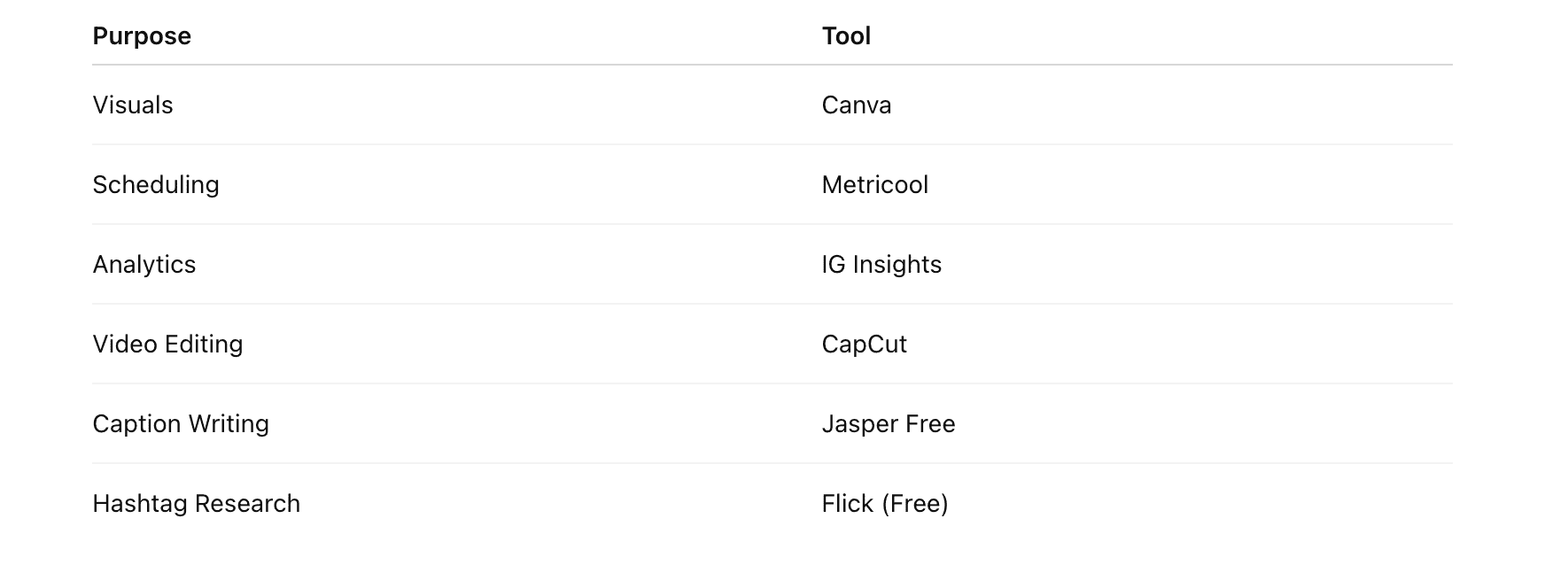
3. Advanced Instagram Tools for Professionals
Once you’ve moved past the beginner stage, it’s not just about posting consistently — it’s about optimizing everything: reach, engagement, conversions, and time.
Whether you're managing multiple accounts, running client campaigns, or creating data-driven content strategies, the right professional-level tools can give you the edge. In 2025, that often means combining automation, analytics, AI, and cross-platform integration — all while keeping your brand voice consistent.
Here are the Instagram tools professionals are using to streamline operations, gain insights, and scale impact.
1. Not Just AI — Smart AI: Jasper, Predis, and Copy.ai
Use it for: Caption generation, content ideas, repurposing across platforms
Why it’s powerful:
Trained on marketing copy and optimized for social channels
Can batch-generate carousel copy, ad captions, or story CTAs
Jasper and Predis now integrate directly with Instagram schedulers
Pricing: Starts at $39/month (Jasper); Free tiers available on some platforms
Pro Tip: Create brand voice templates in Jasper so you don’t sound generic across posts.
2. SocialCal or Iconosquare – Deep Analytics & Reporting
Use it for: Performance benchmarking, campaign tracking, reporting for clients
Why pros love it:
Track multiple accounts in one dashboard
Competitor and industry benchmarking
Branded PDF reports for teams or clients
Pricing: Socialinsider from $99/month; Iconosquare from $49/month
Pro Tip: Use benchmarking to spot industry trends before your competitors do.
3. Metricool Pro / Later Advanced – Full-Stack Publishing
Use it for: Scheduling + advanced analytics + bio link management
Why it’s advanced:
Auto-publishes Reels and Carousels (not all tools can)
Visual calendar with cross-platform publishing
UTM tracking and SmartLinks for ROI attribution
Pricing: Metricool from $18–55/month; Later Advanced $40+/month
Pro Tip: Use SmartLinks to track what type of content drives the most link clicks — Stories, bio, or Reels CTAs.
4. Manychat + Meta’s DM Automation – Sales Funnels in Your Inbox
Use it for: Lead capture, qualification, and conversion inside DMs
Why it’s essential now:
Keyword-based responses (e.g., reply “freebie” to get a PDF)
Delivers PDFs, promo codes, or mini-courses
Works directly inside Instagram with Meta approval
Pricing: Free for small accounts; paid from $15/month
Pro Tip: Add a DM call-to-action to Reels (“Comment ‘guide’ to get the full list”) and automate the delivery.
5. Shopify + Linkpop / Koji / Beacons – Monetization Stack
Use it for: Turning followers into customers
Why it works:
Direct integration between Instagram, Shopify, and your link-in-bio
Sell digital products, courses, coaching, or merch
Upsell and cross-sell automation
Pricing: Linkpop (free with Shopify), Koji/Beacons (free + paid upgrades)
Pro Tip: Create custom landing pages for each funnel — one for Reels, one for Stories, one for Lives.
6. Zapier or Make (Integromat) – Seamless Tool Integration
Use it for: Connecting Instagram to Google Sheets, Notion, email lists, and beyond
Why pros use it:
Trigger actions from new followers, DM keywords, or tagged content
Automate analytics reporting or audience segmentation
Create a custom “tool stack” tailored to your workflow
Pricing: Free plans available; paid from $19/month
Pro Tip: Automate a Notion content calendar synced with Instagram post performance.
Pro-Level Use Case:
Client Management Stack (Agency or Freelancers):
Content: Canva Pro + Jasper
Publishing: Metricool + Zapier
Analytics: Socialinsider + Notion
Client Delivery: Branded reports, scheduled audits, automated feedback loops
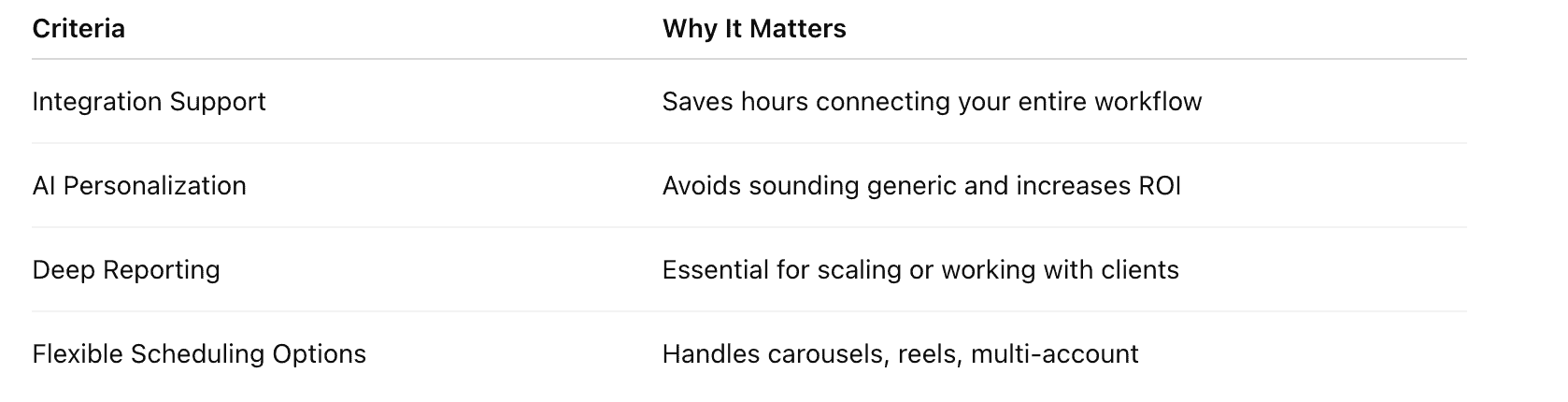
4. Instagram Tools for Businesses
Instagram is no longer just a “branding platform” for businesses. In 2025, it’s a full-scale sales, support, and lead generation engine — if you use the right tools.
Whether you're a small e-commerce shop, a digital product creator, or a local service provider, your Instagram presence can directly drive revenue. But that only happens when your tools are set up to support real business outcomes — not just vanity metrics.
This section breaks down the top tools that help businesses sell, serve, and scale on Instagram.
1. Shopify + Linkpop (or Koji) – Turn Followers Into Customers
Use it for: Seamless product sales from your Instagram bio
Why it’s critical:
Direct integration with Instagram Shop
Linkpop generates high-converting product links and landing pages
Koji offers microstores, tip jars, bundles, and gated content
Pricing:
Linkpop: Free with Shopify
Koji: Free + premium templates and apps
Pro Tip: Use UTM tags on your Linkpop/Koji links to track exact ROI from Stories, Reels, or carousel posts.
2. Meta DM Automation + Manychat – Scale Customer Support & Lead Capture
Use it for:
Responding to FAQs automatically
Delivering lead magnets (eBooks, discount codes)
Pre-qualifying leads before sending them to sales or DMs
Why it works for businesses:
Reduces customer service time
Automates repetitive questions (like pricing or availability)
Starts sales conversations 24/7
Pricing: Free for small accounts; paid plans from $15/month
Pro Tip: Create story highlights labeled “DM Us” with instructions to trigger automation (e.g., “Reply ‘guide’ to get our pricing sheet”).
3. Email + CRM Integrations via Zapier or Make
Use it for:
Adding new followers or leads to your email list
Segmenting followers based on content they engage with
Triggering email sequences based on DMs
Why it’s powerful for business growth:
Moves followers off Instagram into owned channels (email, CRM)
Supports full-funnel marketing and lifecycle nurturing
Enables better follow-up without spamming
Tool combo ideas:
Instagram → Manychat → Zapier → Mailchimp/ActiveCampaign
Instagram → DM keyword → Freebie → CRM lead score
Pricing: Zapier/Make from $19/month; CRM tools vary
Pro Tip: Offer exclusive resources (like a free audit or checklist) via DM and sync email collection into your CRM.
4. Brand24 or Awario – Social Listening for Competitor & Industry Insights
Use it for:
Monitoring brand mentions or product keywords
Tracking competitor campaigns
Discovering trending topics or customer pain points
Why it matters for businesses:
Helps inform content strategy
Identifies brand sentiment in real time
Flags customer issues before they escalate
Pricing: Starts at $39/month
Pro Tip: Set up alerts for competitor hashtags, your product category, and brand keywords — and use that intel to create reactive content.
5. SocialCal or Sprout Social – ROI-Focused Instagram Analytics
Use it for:
Measuring conversion from Instagram traffic
Understanding content that drives actual revenue
Analyzing Stories vs. Reels performance for sales
Why businesses need it:
Instagram Insights doesn’t give ROI clarity
Socialinsider benchmarks you against competitors
Sprout Social integrates with Shopify for e-comm tracking
Pricing:
Socialinsider: From $99/month
Sprout Social: From $249/month (enterprise-grade)
Pro Tip: Use data to double down on high-ROI formats (e.g., Reels that drive checkouts) and drop low performers.
Bonus: Productivity & Collaboration Tools for IG Teams
If you have a team or manage multiple accounts, these are must-haves:
Notion – Content calendar, asset library, team feedback
Slack or ClickUp – Campaign communication
Airtable – UGC tracking and influencer CRM
Trello with Zapier – Auto-update content tasks from Instagram posts
5. Instagram Tools for Content Creators
Building a personal brand, staying on top of trends, posting consistently, managing collabs, and monetizing — without burning out — takes more than raw talent.
This section covers the essential Instagram tools that help creators produce better content, grow faster, and turn creativity into income.
1. CapCut + InVideo – Next-Level Video Creation for Reels
Use it for:
Editing Reels with trending transitions, captions, and effects
Auto-cutting long videos into short-form clips
Reusing YouTube/TikTok/Podcast content for Instagram
Why creators love it:
Tons of viral templates and sound sync
One-click subtitles and motion text
Fast exports optimized for Reels and Stories
Pricing:
CapCut: Free with Pro features available
InVideo: Free trial, paid from $15/month
Pro Tip: Batch film content once a week and use templates to speed up the editing process.
2. SocialOrbit or StoryLab.ai – AI Caption & Hook Writing
Use it for:
Writing strong captions and first-line hooks
Repurposing blog or video content into Instagram posts
Keeping your voice consistent while scaling output
Why it’s a creator favorite:
Speeds up writing without sounding generic
Great for hooks, CTAs, and carousels
Custom tone profiles for different clients or niches
Pricing: From $39/month
Pro Tip: Create a "hook bank" inside Notion or Airtable using Jasper’s outputs.
3. Trend Prediction Tools: TrendTok, Exploding Topics, Glimpse
Use it for:
Spotting viral trends before they explode
Identifying audio, topics, or hashtags that will soon trend
Planning content that hits the algorithm wave early
Why it matters in 2025:
Reels performance is still heavily trend-driven
Creators who spot early trends dominate Explore
Pricing: Free to ~$49/month
Pro Tip: Set up alerts for your niche and create “trend-reactive” content within 24–48 hours.
4. Beacons, Stan Store, or Koji – Monetize Without a Website
Use it for:
Selling digital products, coaching, templates, or services
Collecting emails and delivering freebies
Taking paid DMs or offering mini-courses
Why it’s a creator must-have:
Mobile-first landing pages
One-link solutions with tip jars, lead capture, and upsells
Handles both product hosting and payments
Pricing: Free + paid upgrades (Stan from $29/mo, Beacons free + pro plans)
Pro Tip: Bundle your top 3 freebies, challenges, or templates to increase perceived value and lead gen.
5. Collab & UGC Tools: Collabstr, Billo, Influence.co
Use it for:
Finding paid brand deals
Managing user-generated content campaigns
Tracking deliverables, usage rights, and payments
Why it's key for scaling:
Saves time pitching brands
Gives access to brief-ready campaigns
Helps creators get paid on time
Pricing: Free to browse, some commission-based
Pro Tip: Add case studies and engagement metrics to your creator profile — data wins deals.
6. Notion or Airtable – Organize Content & Pitch Brands
Use it for:
Content planning and batching
Tracking brand pitches, collaborations, deadlines
Building a personal creator CRM
Why creators need it:
Keeps everything in one place
Adds structure to creative chaos
Scalable as your brand and income grow
Pricing: Free plans available
Pro Tip: Use calendar + database views to plan weekly content, sponsored posts, and launches together.
6. Comprehensive Tool Comparisons
Scrolling through endless “Top 10 Instagram Tools” lists can leave you more confused than when you started.
So in this section, we’re doing something different: side-by-side visual comparisons across categories like content creation, scheduling, analytics, and growth. You’ll get pricing details, core features, pros and cons, and who each tool is best for — in one clean table per category.
Whether you're a creator on a budget, a business scaling up, or a social media pro juggling multiple accounts, this section will help you build your ideal tool stack.
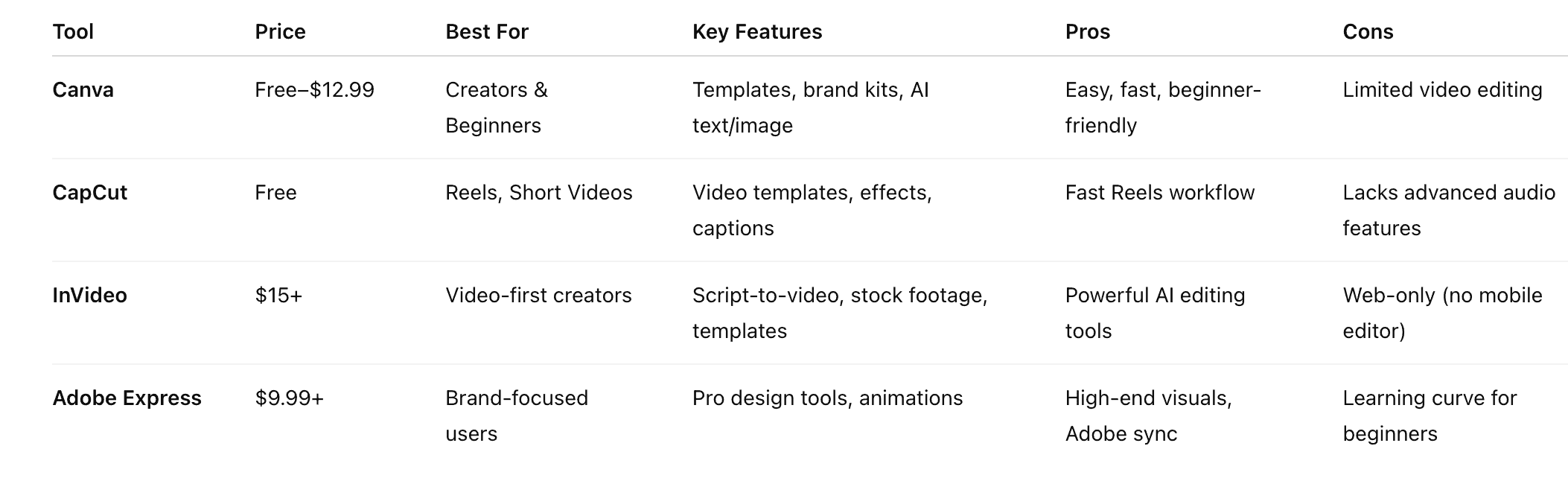
Quick Tip: Canva + CapCut is a solid free duo for creators starting out. Add InVideo if you repurpose long videos or want AI scripting.
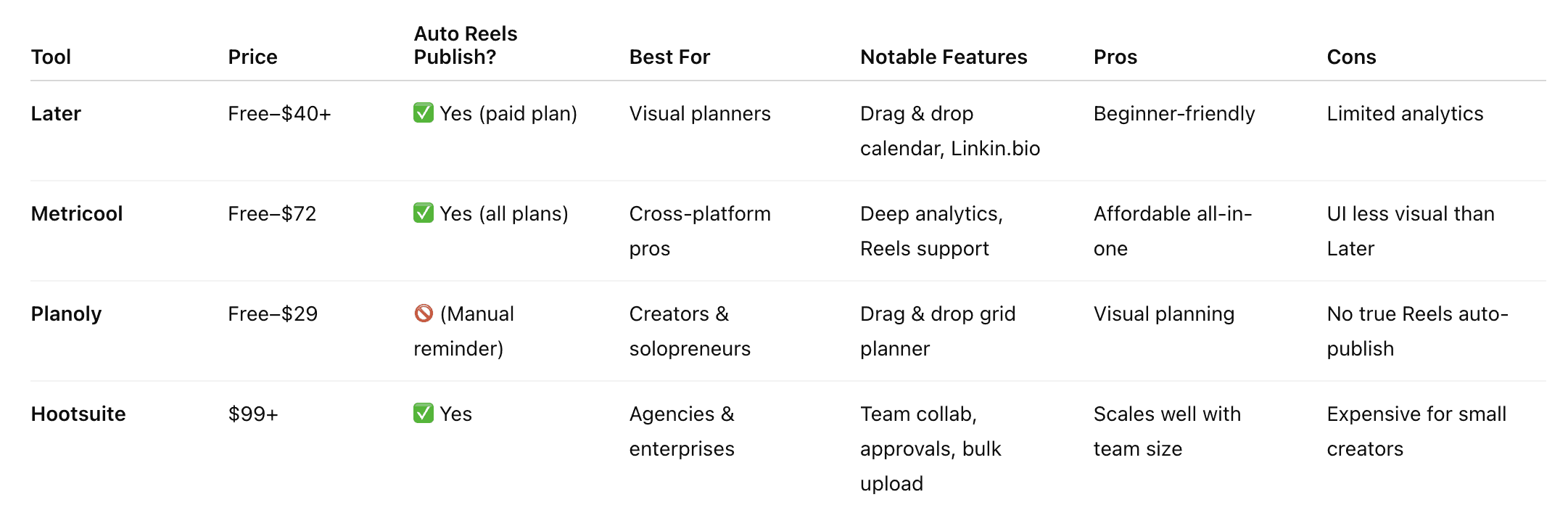
Quick Tip: Metricool hits the sweet spot between affordability, features, and growth tracking — ideal for scaling creators and businesses.
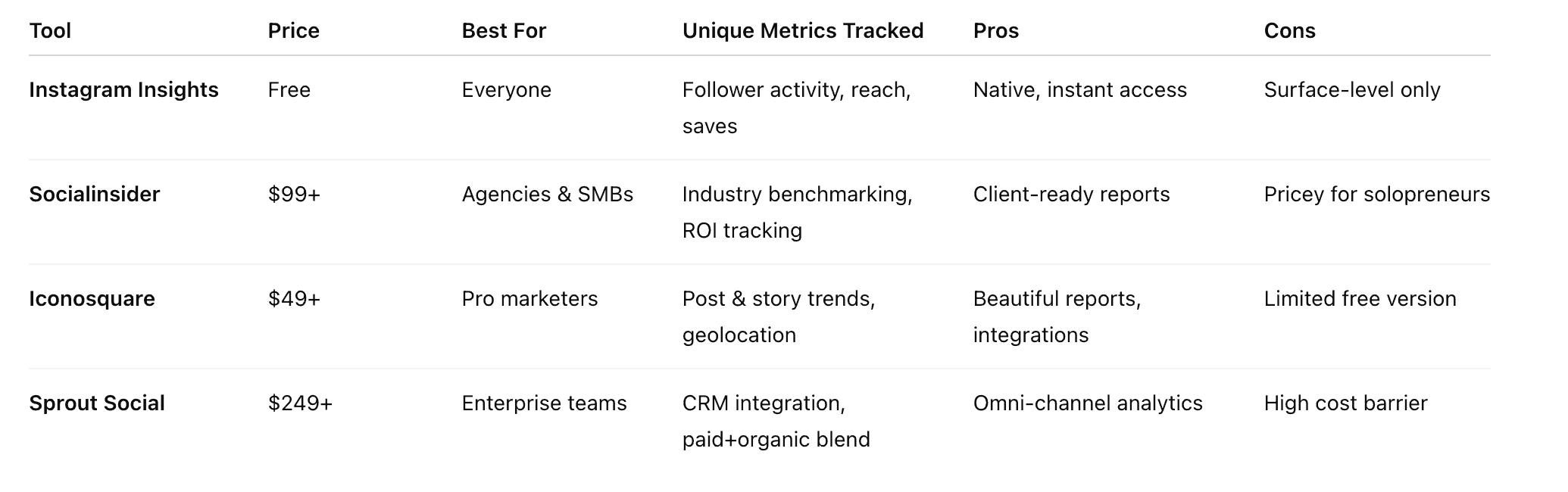
Quick Tip: Start with Instagram Insights. Upgrade to Iconosquare if you manage client accounts or want deeper analytics without breaking the bank.
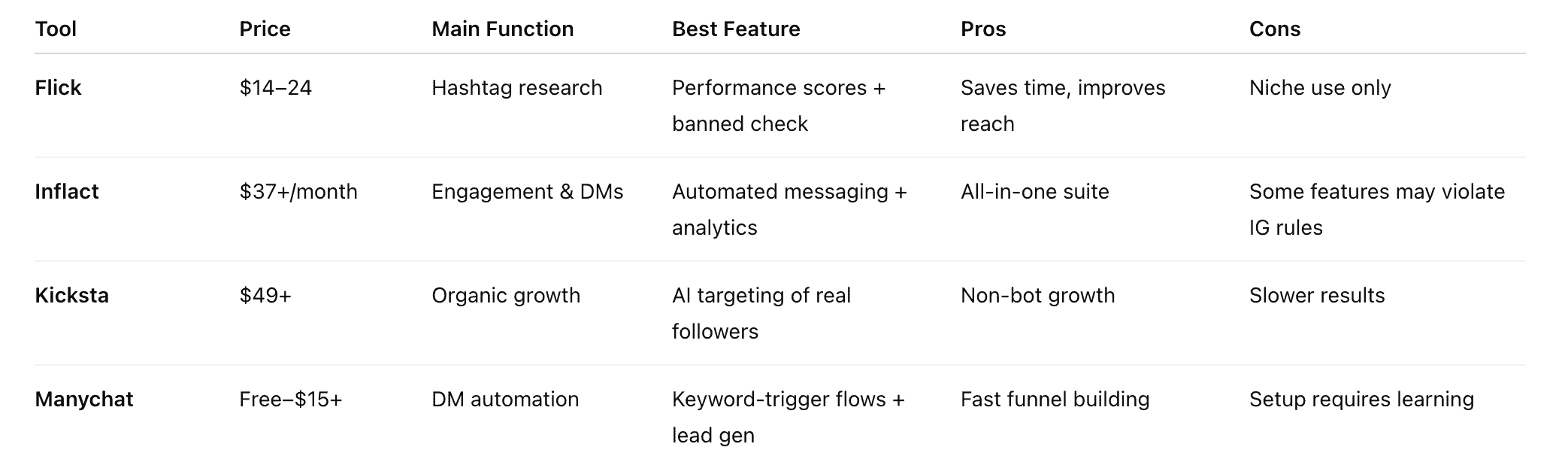
Quick Tip: Avoid Instagram tools that offer fake followers. Tools like Manychat and Kicksta offer authentic, algorithm-safe growth when used correctly.
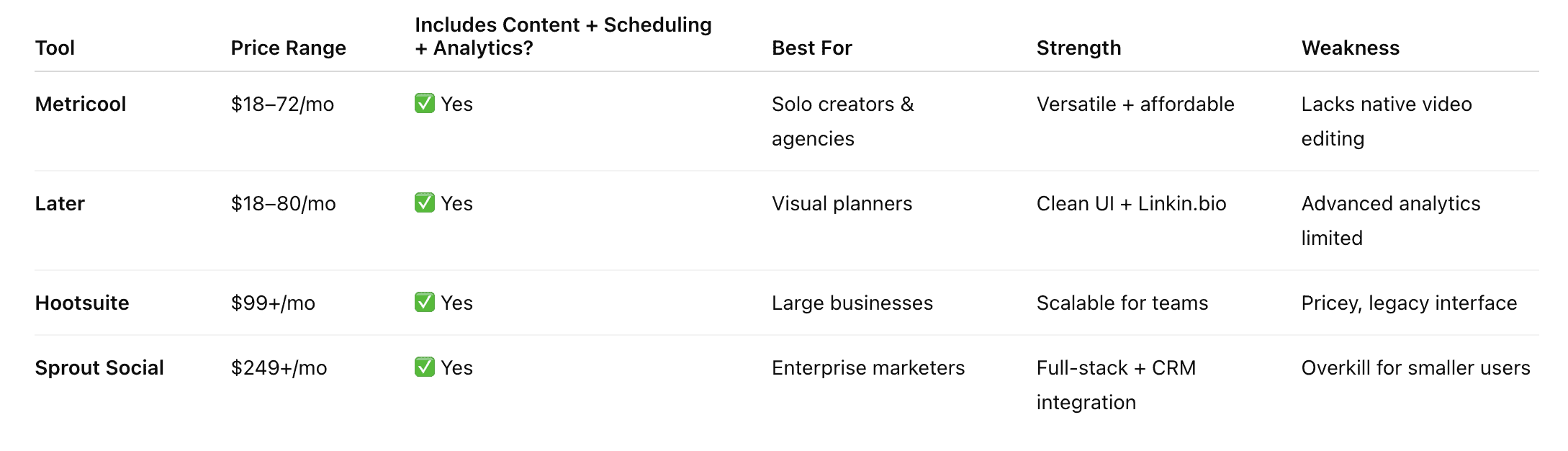
Quick Tip: If you’re just building your stack, Metricool or Later are the most balanced starting points — choose based on whether you value analytics (Metricool) or UI design (Later).
What These Comparisons Show:
Free Instagram tools are great for starting — but don’t scale well.
Reels auto-publishing is essential in 2025 — not every scheduler supports it.
Manychat + a good scheduling tool = basic funnel automation without paying for high-end CRM tools.
Mixing 1-2 best-in-class tools often beats one-size-fits-all platforms.
7. Implementation Strategies: How to Build and Use Your Instagram Tool Stack
Knowing what tools to use is half the battle — the other half is making them work together in a way that saves time, drives results, and fits your unique content goals.
This section covers:
How to build a lean but powerful Instagram tool stack
Suggested workflows for different types of users
Automation strategies that keep things authentic
Mistakes to avoid when stacking Instagram tools
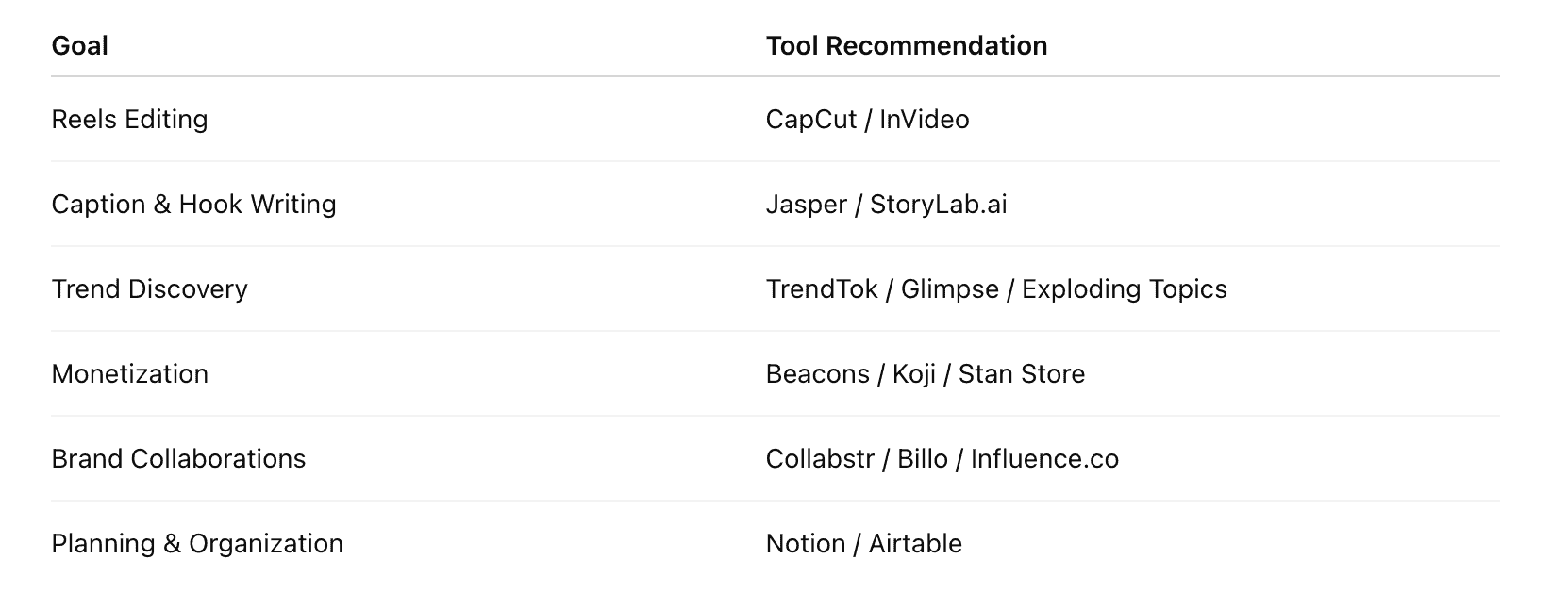
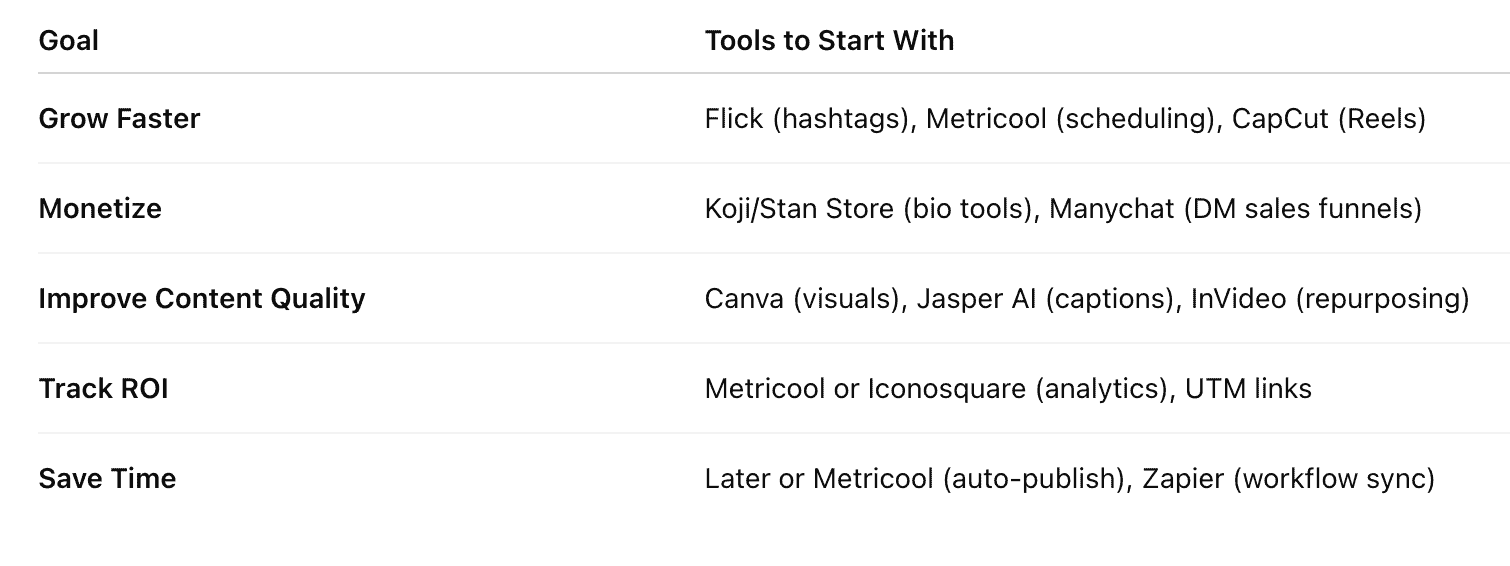
Step 1: Build Your Tool Stack Based on Goals
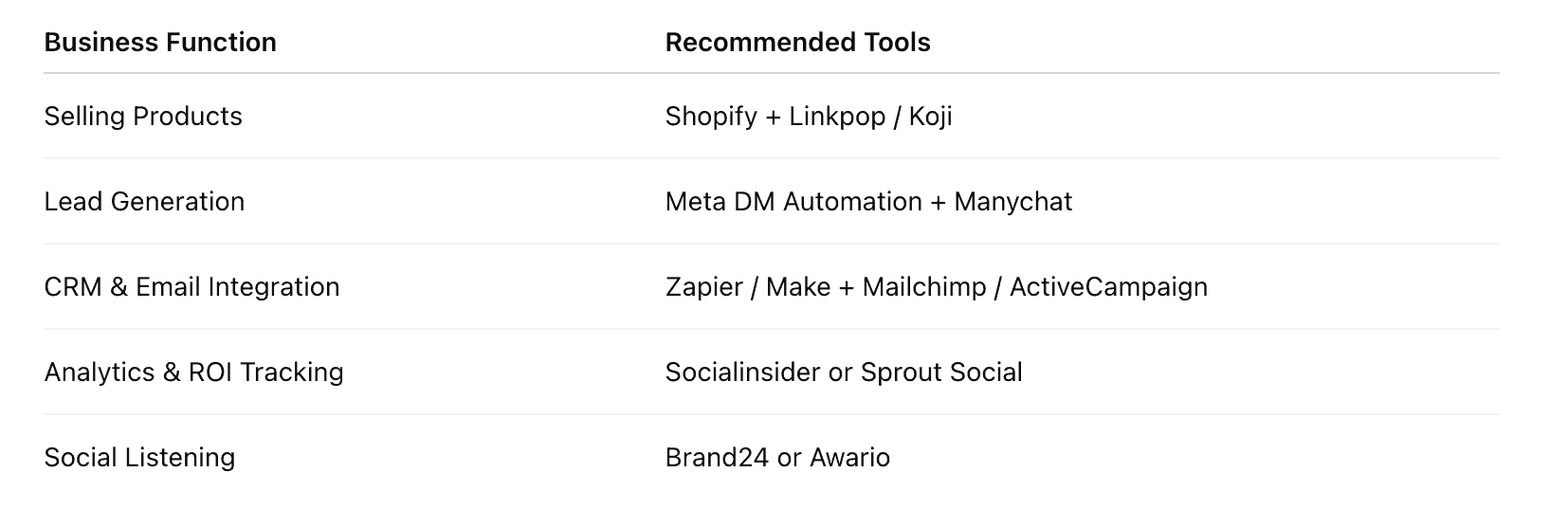
Not every creator or business needs 10 tools. Here's a quick breakdown by outcome:
Step 2: Implement These Proven Workflows
Creator Workflow (Content + Growth)
Research trends → Use TrendTok or Exploding Topics
Batch content → Film 3–5 Reels per week with CapCut
Write captions/hooks → Jasper + hook templates
Schedule posts → Metricool or Later
Engage manually for 15 mins/day before and after posting
Track top-performing formats → Instagram Insights or Iconosquare
Business Workflow (Sales + Support)
Create branded templates → Canva Pro
Schedule content → Metricool (include Story reminders)
Set up DM keyword automations → Manychat (e.g., “guide”, “pricing”)
Drive traffic to link-in-bio → Koji or Linkpop (connected to Shopify)
Capture leads → Connect Manychat → Mailchimp via Zapier
Analyze conversion points → Metricool link tracking or Sprout Social
Freelancer/Agency Workflow (Client Campaigns)
Use Notion for campaign planning
Create assets with Canva, CapCut, or InVideo
Auto-publish content via Metricool or Hootsuite
Run client reports → Socialinsider with PDF export
Organize client feedback → Airtable or Trello synced via Zapier
Optimize strategy monthly based on analytics
Step 3: Automate Without Losing Authenticity
It’s tempting to automate everything — but overdoing it can hurt your brand. Here’s how to strike the balance:
Automate:
Post scheduling
DM replies to lead magnets
Story reply triggers (e.g., “Get this guide”)
Content repurposing across platforms
Avoid Automating:
Comments (spammy and easy to detect)
Personalized outreach
Community responses (e.g., polls, DMs from followers)
Pro Tip: Use tools to start conversations automatically, but step in to close them personally.
Common Mistakes to Avoid
Using too many tools that overlap — creates confusion and wasted spend
Ignoring integration — use Zapier or native integrations to connect tools
Focusing only on growth tools — prioritize tools that drive revenue, too
Not tracking ROI — if a tool isn't delivering results, swap or scale it back
Automating before you understand your audience — keep a human touch
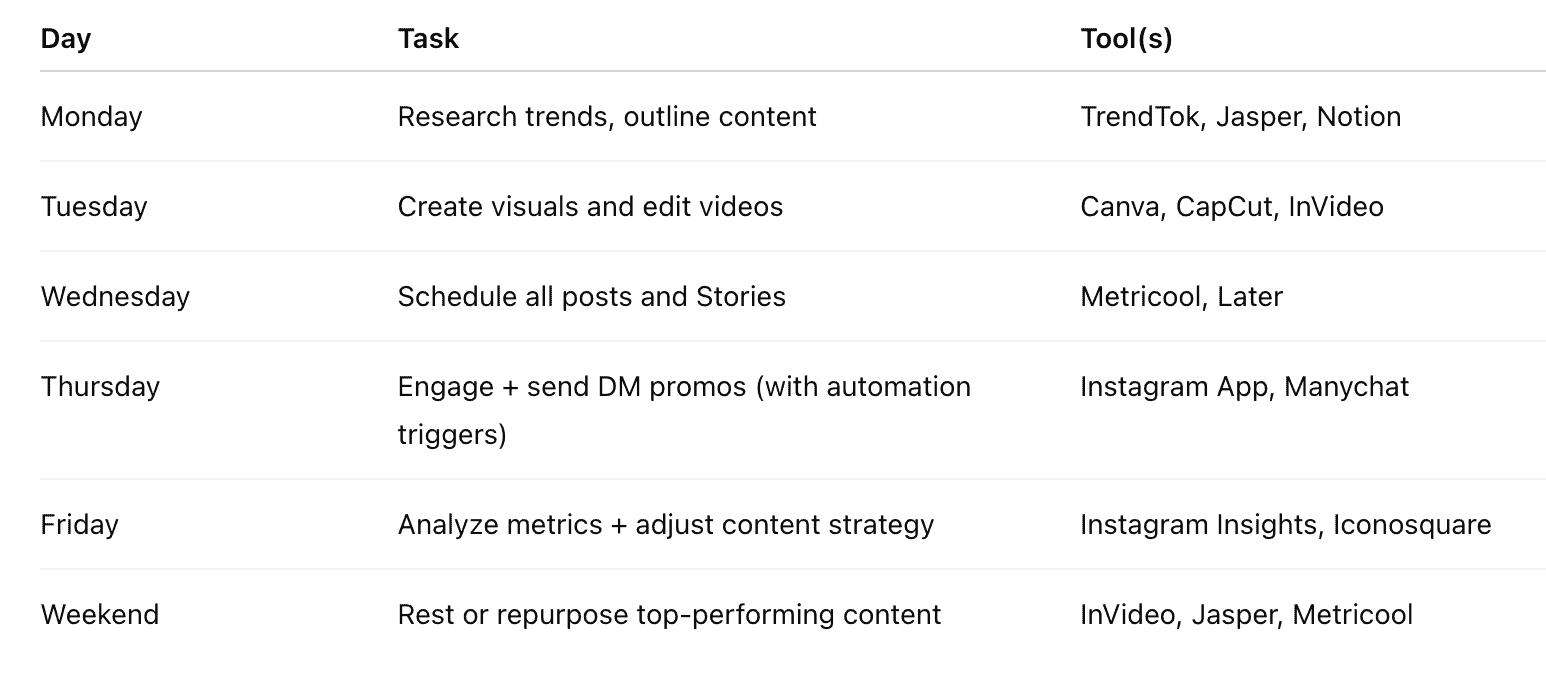
Bonus: Build Your Weekly Instagram Workflow
8. Measuring ROI from Instagram Tools
Investing in Instagram tools without measuring their impact is like driving with your eyes closed — you might move, but you’ll have no idea where you're headed.
In 2025, measuring the return on investment (ROI) of your tool stack is not just smart — it's necessary. With dozens of freemium models, AI add-ons, and tiered subscriptions, knowing which tools are worth paying for can make or break your content, business, or marketing budget.
This section will help you:
Identify the right metrics for each type of tool
Calculate ROI based on real performance
Know when it’s time to upgrade, cancel, or switch
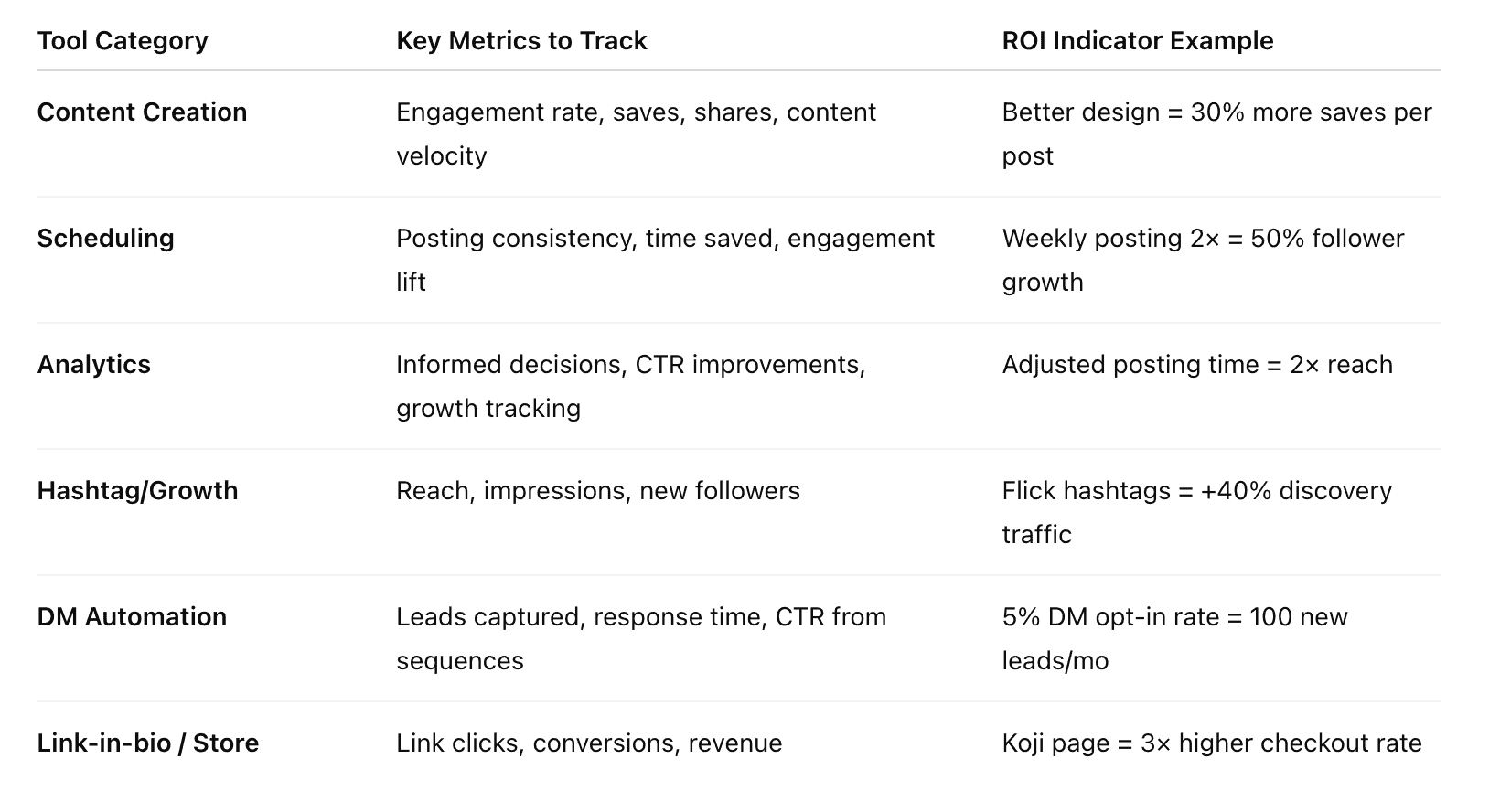
Step 1: Define Your Success Metrics (By Tool Type)
Different tools drive different outcomes. Here’s how to track each one:
Step 2: Use This Simple ROI Formula
For paid tools, use this to determine financial return:
ROI = (Revenue Generated – Tool Cost) / Tool Cost × 100
For example:
You use Manychat ($15/month) to automate your DM funnel.
In one month, it helps you close 3 digital product sales at $49 each = $147 revenue.
ROI = (147 – 15) / 15 × 100 = 880%
Even if you're not directly selling, ROI can be measured in time saved, clients closed, or followers gained.
Step 3: When to Upgrade, Cancel, or Switch
Upgrade when:
You consistently max out features or limits (e.g., Reels posting, automation slots)
ROI is 3–5× the tool cost
Your content system is running well, and you're ready to scale
Cancel when:
You haven’t used it in 4+ weeks
You're paying for features you never touch
It duplicates another tool already in your stack
Switch when:
A newer tool offers more integrations or better UX
A competitor tool saves time or money
Your goals shift (e.g., from engagement → monetization)
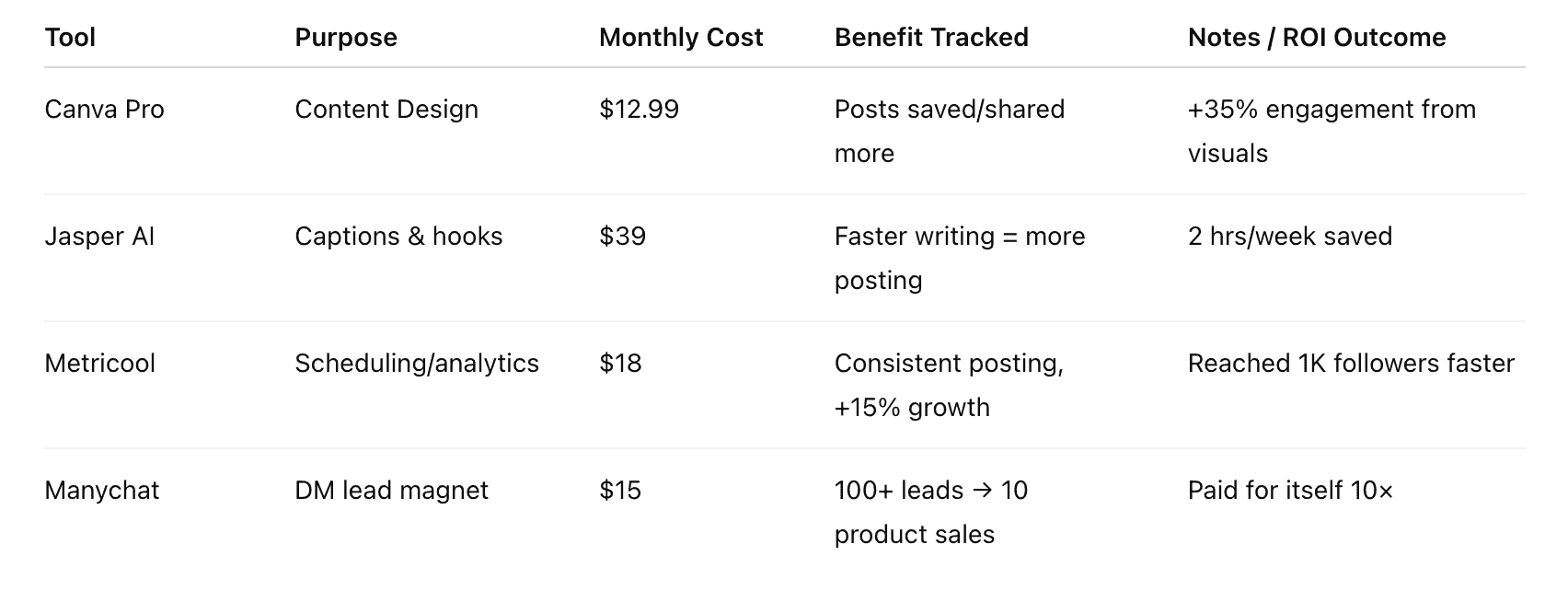
Monthly ROI Tracker Template (You Can Repurpose This for Your Blog)
9. Future Trends in Instagram Tools (2025 and Beyond)
Instagram is evolving fast — and so are the tools that power it.
As we look beyond 2025, Instagram tools aren’t just getting better — they’re becoming smarter, more integrated, and more creator/business-centric than ever. AI, automation, and augmented experiences are no longer optional; they’re becoming the new standard.
This section explores the future of Instagram tools — what’s here now, what’s on the horizon, and how you can prepare to stay ahead.
1. AI-Powered Content Creation Gets Personal
AI-generated content is no longer limited to generic captions. In 2025, we’re seeing a new wave of tools that:
Auto-edit Reels from long-form content (e.g., Opus Clip, Vizard)
Generate visual assets and storyboards using prompts
Adapt your content style based on audience engagement data
Suggest hooks and CTAs based on algorithm behavior and user preferences
What this means:
Creators and marketers will be able to produce more relevant, personalized content in less time — without losing their voice.
Watch for:
Tools that analyze your audience and adjust your copy tone accordingly
Prompt-based Reels generation (already in beta with several platforms)
2. Predictive & Behavioral Analytics
Instead of just showing “what happened,” next-gen tools will tell you:
What’s about to trend in your niche
Which followers are likely to convert or churn
Which post formats will perform best this week based on your history
Think: Instagram tools that think for you, not just track your stats.
Emerging examples:
Socialinsider AI Labs (beta)
Metricool’s Smart Forecasting
Exploding Topics AI Signals
Why it matters:
You’ll make decisions before they’re obvious — which is exactly how top accounts stay ahead of the curve.
3. Native Commerce and AR Integration
Instagram is pushing hard into native shopping and immersive content. In the near future:
Creators can host AR product try-ons directly from Stories
Businesses can use shoppable Reels powered by AI product tags
Users will experience “Instagram Live shopping” with in-app checkout + DM receipts
Tools will adapt to support this by:
Integrating AR try-on generators (e.g., for fashion, makeup, interiors)
Automating inventory sync between Shopify and Instagram Shop
Embedding one-click checkouts inside Reels or Story links
Pro Tip: Choose link-in-bio tools that already integrate with commerce platforms and AR experiments (e.g., Koji, Stan Store).
4. Voice and Audio-Based Control
As voice tech expands, we’re seeing early signs of:
Voice-to-caption tools for creators filming on the go
AI voice clones for repurposing videos in multiple languages
Siri/Alexa-like assistants inside tools for faster content setup
Imagine telling your tool:
“Schedule my next five Reels, use last week’s top caption style, and insert trending hashtags in my niche.”
We’re not far off.
Watch for tools integrating:
Voice-controlled scheduling
Audio-first repurposing platforms (esp. for podcasters)
5. Ethical Automation and Privacy-First Tools
Users are more sensitive to spammy automation — and Instagram is too. Tools that survive (and thrive) in 2025 will:
Respect platform guidelines
Offer opt-in automation (DM sequences triggered by keywords, not bots)
Build trust with ethical engagement workflows
Also important:
Tools that comply with privacy regulations (GDPR, CCPA)
First-party data tools (email opt-ins, DM list-building)
Pro Tip: Use automation for helpful utility (like delivering resources), not for pretending to be human.
The Future Instagram Tool Stack Might Look Like:
AI Editor: Opus Clip for repurposing
Predictive Planner: Metricool Smart Calendar
Voice AI Assistant: Jasper Voice (hypothetical)
Immersive Commerce: Shopify + AR Story integration
Data Bridge: Zapier + first-party CRM
DM Funnels: Manychat with ethical flows
How to Future-Proof Your Instagram Tools Stack
Invest in tools with AI roadmaps — not just legacy features
Look for integrations with platforms like Shopify, Notion, and CRMs
Automate ethically — utility > fake engagement
Plan for omni-channel — most tools are shifting toward cross-platform utility
Track early movers — creators who adopt new tools first usually win the algorithm race
Niche | Recommended Stack |
Coaches & Educators | Canva, Jasper, Manychat, Stan Store, Notion |
E-commerce Brands | Shopify, Linkpop, CapCut, Metricool, Sprout Social |
Fitness Creators | CapCut, TrendTok, Beacons, Later, Instagram Insights |
Podcasters & Video Creators | Opus Clip, InVideo, Jasper, Koji, Instagram Insights |
Agencies & Freelancers | Notion, Metricool, Iconosquare, Canva, Airtable |
Final Action Steps
Ready to apply everything you’ve learned? Here’s a step-by-step summary:
Define Your Primary Instagram Goal
Growth, engagement, monetization, or analytics?Select 3–5 Tools That Align With That Goal
Use the comparison tables in Section 6 for clarity.Set Up a Weekly Workflow
Use the frameworks in Section 7 to stay consistent without burnout.Track Your ROI Monthly
Monitor time saved, leads generated, conversions, or growth benchmarks.Stay Updated
Subscribe to blogs like Social Media Today, Product Hunt, or Exploding Topics
Follow your favorite tools’ update blogs or roadmapsIterate Quarterly
Tools evolve. Audit your stack every 3 months. Drop what’s not working, scale what is.
Final Thoughts
Instagram success in 2025 isn’t just about being creative — it’s about being strategic.
The right tools help you do more with less: post smarter, grow faster, convert better, and spend less time glued to your phone. But only if you use them intentionally.
This guide wasn’t just about which buttons to press — it was about building a tool stack that fits you.
Now go build your stack. Automate the boring. Focus on what only you can do.
Related Articles
Do Backlinks From Directories Still Help SEO?
Wondering if directory submissions still work? High-quality, niche directories build essential brand signals, but automated link farms can actually harm your site. Here is how founders should handle directory backlinks today.
I Tested 50 Platforms: 7 SaaS Directories That Send Real Traffic
Stop submitting your startup to ghost towns. Here is the honest truth about the 7 SaaS directories that actually send real traffic, based on real submission data.
How to Write a Product Hunt Tagline That Converts
Your Product Hunt tagline is the difference between a click and a scroll. Learn how to write a 60-character pitch that converts, using proven frameworks and real examples.